For keys players on a Mac
Every sound for your live set. One window.
Keyloft stacks and splits the instruments you already own and switches between them in one tap. Play it inside Logic Pro, Ableton Live and other popular DAWs, or on its own in the Keyloft app, no DAW needed.
One-time purchaseUp to 3 MacsmacOS 11 or laterApple silicon and Intel
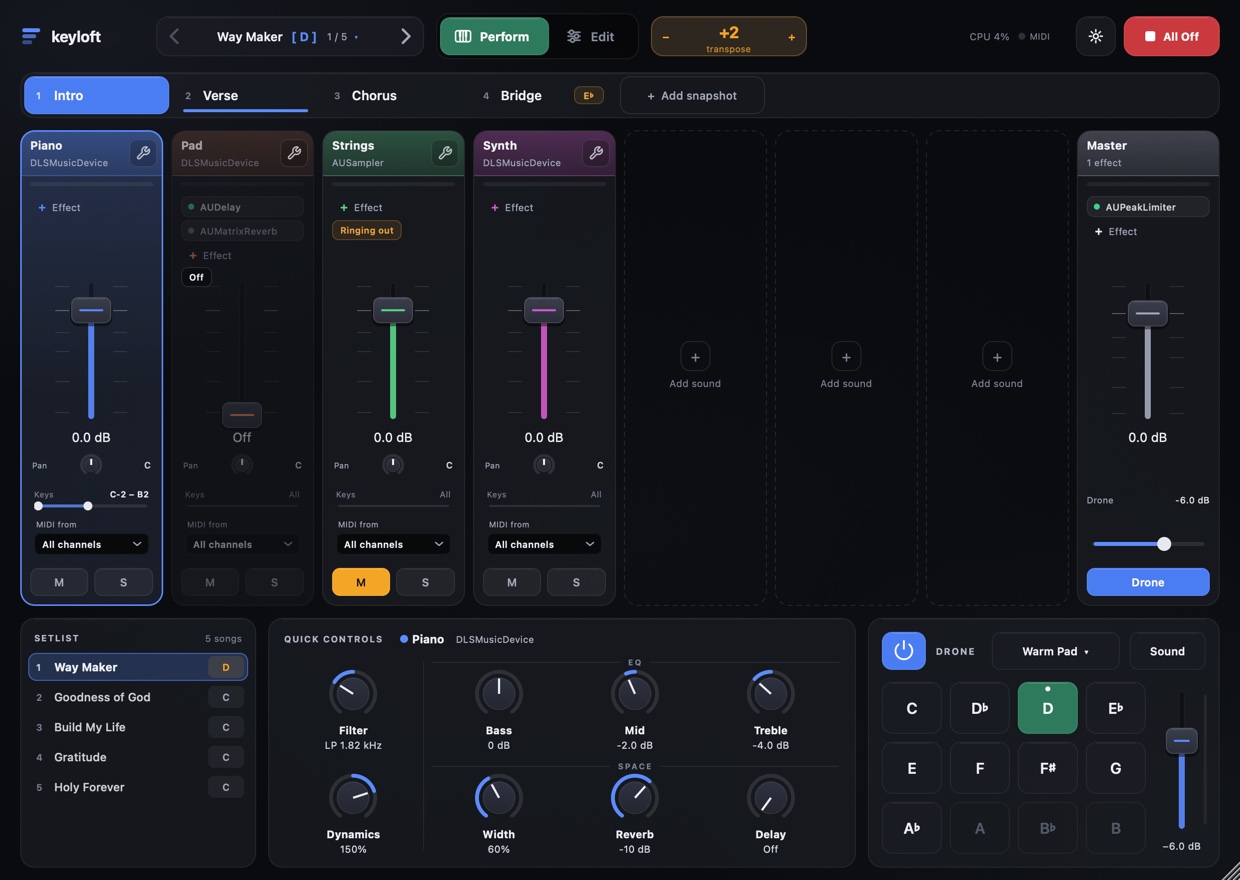
IN YOUR DAW · AU + VST3 · KEYLOFT COMPLETE
Logic Pro, Ableton Live and other popular DAWs
Load it like any instrument plug-in. Logic uses the Audio Unit; Ableton Live can use the Audio Unit or the VST3.
NO DAW NEEDED · BOTH EDITIONS
The Keyloft app
Its own app for the stage: open it, plug in your keyboard and play, with backing tracks and a click built in.
Bring the sounds you already love.
Keyloft opens any Audio Unit or VST3 instrument or effect on your Mac. The pianos, pads, synths and strings you already own, paid or free, side by side in one window.
- KeysKeyscapeSpectrasonics
- SynthOmnisphereSpectrasonics
- SamplerKontaktNative Instruments
- PianoNoireNative Instruments
- PianoPianoteqModartt
- Keys & synthsAnalog LabArturia
- SynthSerumXfer Records
- SynthDivau-he
- FreeLABSSpitfire Audio
- PianoUna CordaNative Instruments
- SynthPigmentsArturia
- Electric pianoStage-73 VArturia
- OrganB-3 VArturia
- KeysAddictive KeysXLN Audio
- Free synthVitalVital Audio
- Free synthSurge XTSurge Synth Team
- ReverbValhallaShimmerValhalla DSP
- DelayEchoBoySoundtoys
- StringsCinematic Studio StringsCinematic Studio Series
Product names are trademarks of their owners, shown only to say Keyloft can open them. Keyloft isn't affiliated with or endorsed by them, and doesn't include them.
Stack it, split it, shape it.
Up to eight instruments side by side: any Audio Unit or VST3 you own, from free synths to the libraries you paid for.
- Splits and layers. Each instrument gets its own key range, velocity range and MIDI channel.
- A full channel strip. Volume, pan, mute, solo, octave and transpose, with three effect slots and a master bus.
- Sustain your way. Choose which layers hold with the pedal, so the pad sustains and the piano doesn't.
Verse to chorus in one tap.
A snapshot is how your layers play in one part of a song: which ones sound, how loud, with which effects, even in which key. Tap the next one, or step through with a pedal.
- Nothing cuts off. A sound you switch off rings out, so a chord can carry across the change.
- The whole set, in order. Every song keeps its own instruments, snapshots, key and tempo. Next song is one button away.
- Key changes built in. Give the last chorus its own transpose and it's there when you tap it.
The knobs you actually reach for.
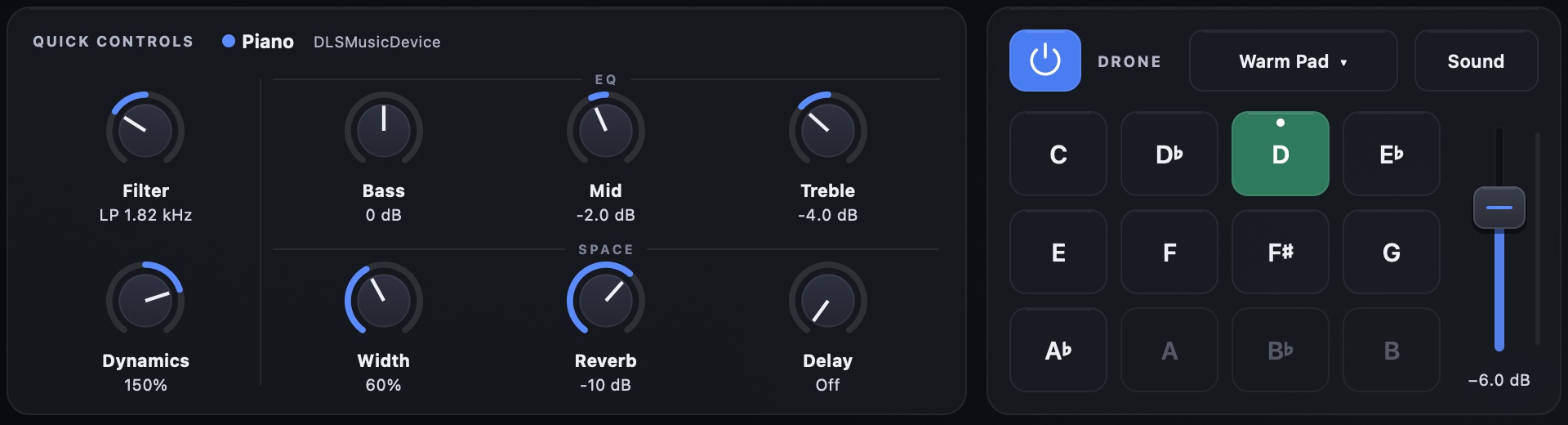
Filter, bass, mid, treble, width, reverb and delay are built into every layer, with the same names on every instrument, so you never dig through a synth's menus mid-song. Dynamics sets how hard you have to play. And the drone plays a warm pad in any key, under everything, at its own level.
- Eight macros. One knob can turn many settings across layers, each with its own range and curve.
- Learn from anything. Click MIDI Learn, move a knob on your controller, done. Your DAW can automate them too.
Your tracks, with the click in your ears.
A song can bring its stems. The music goes to the room; the click and the guide go to your in-ears. Jump to any section on the beat, vamp for as long as the moment needs, fade out, or play at another tempo in the same key.
- Sections you can see. Tap one and it comes in at the end of the bar or section, never by guesswork.
- Works with your other gear. Follow Prime or Playback over MIDI, and let any controller change songs and sections.
Built so the set doesn't stop.
Keyloft is made by a worship keys player, for the moment nobody can afford a problem.
A crashing plug-in stays out
Plug-ins are tried in a separate process first. One that crashes is set aside, and your set opens without it.
Saves as you play
The app saves every few seconds and opens where you left off, even after a crash.
Unplugged? Still playing.
If the audio interface drops out, Keyloft carries on through the Mac, and goes back to it when it returns.
All Off
One big button silences every note on every layer, instantly. Always in the same place.
Faders under your hands
A Korg nanoKONTROL2 works out of the box: faders on layers, buttons on snapshots and songs. Remap any controller.
Light, and in time
CPU at a glance in the top bar. Keyloft tells your DAW its latency, so every layer stays in time.
Two ways to play. Launch prices now.
For Keyloft's first three months, both editions cost much less than they will. Pay once, keep it.
Keyloft App
The Keyloft app on its own. No DAW needed.
$64
$89
Launch price · save $25 $89 after the launch
- The Keyloft app, with backing tracks, click and in-ears.
- Everything for playing live: layers, snapshots, setlist, quick controls, drone.
Need your DAW later? Upgrade to Complete for just $25$40 more. Same key, same Macs.
Buy Keyloft AppKeyloft Complete Everything
The app, plus Logic Pro, Ableton Live and other DAWs.
$89
$129
Launch price · save $40 $129 after the launch
- Everything in Keyloft App.
- The Audio Unit, for Logic Pro, Ableton Live and other AU hosts.
- The VST3, for Ableton Live and other VST3 hosts.
- Pay once. No subscription.
- One key, up to 3 Macs: your laptop, the church Mac, a spare.
- Never needs the internet to play. It activates once on each Mac.
- Free updates for Keyloft 1.
- 14-day refund, for any reason (policy).
Prices in US dollars. Checkout by Paddle, our reseller; sales tax or VAT is added where it applies.
Before you buy.
- Mac
- macOS 11 Big Sur or later, Apple silicon or Intel
- Plays in
- The standalone Keyloft app (both editions). With Keyloft Complete, also Logic Pro (AU), Ableton Live (AU or VST3) and other DAWs
- Hosts
- Your AU and VST3 instruments and effects
- Built in
- Filter, 3-band EQ, width, reverb, delay, dynamics, drone pads, click
- Internet
- Once per Mac, to activate
Does Keyloft come with instrument sounds?
Keyloft plays the instruments you already have, any Audio Unit or VST3: the libraries you've bought, or free ones like Surge XT, Vital and Dexed. (Logic's own instruments, like Alchemy, only work inside Logic.) Its own filter, EQ, reverb, delay and drone pads are built in.
Do I need the internet at the gig?
No. Keyloft goes online once on each Mac to activate your key. After that it plays with no connection at all, forever.
Can I use it on my laptop and the church Mac?
Yes. One key works on up to 3 Macs at a time. To move it to a fourth, deactivate one in Settings › About, or ask for an email link that frees one.
Keyloft App or Keyloft Complete?
If you play live with no DAW, Keyloft App is all you need: it's the whole Keyloft, in its own app, with backing tracks. If you also want Keyloft inside Logic Pro, Ableton Live or another DAW, get Keyloft Complete. You can start with the App and upgrade any time for just $25$40 more, keeping the same key on the same Macs.
Is there a free trial?
No trial, but if Keyloft isn't right for you, you get your money back within 14 days, for any reason.
What happens if one of my plug-ins crashes?
Keyloft tries new plug-ins in a separate process, so a crash there can't take Keyloft down, and a plug-in that keeps crashing is set aside. And if the app ever does go down, it reopens your setlist and leaves out the plug-in that was opening when it happened.
Windows? Pro Tools?
Not yet. Keyloft is for the Mac: its own app, an Audio Unit and a VST3.
How do I get help?
Email support@keyloftaudio.com. A real keys player answers.